
eCommerce category page SEO is the process of optimizing category (or collection) pages so they rank for broad commercial searches like “women’s running shoes” or “organic skincare products” and guide shoppers to the right products. These pages sit between your homepage and your product pages, so they often carry more ranking potential than any single product.
The short version: match the page to commercial search intent, add useful content, link it into a logical site structure, control which URLs get indexed, and make the page easy for both search engines and AI systems to understand.
This guide covers each step, with examples and Shopify-specific notes.
Category Page vs Product Page vs Blog Post: Which Should Target What?
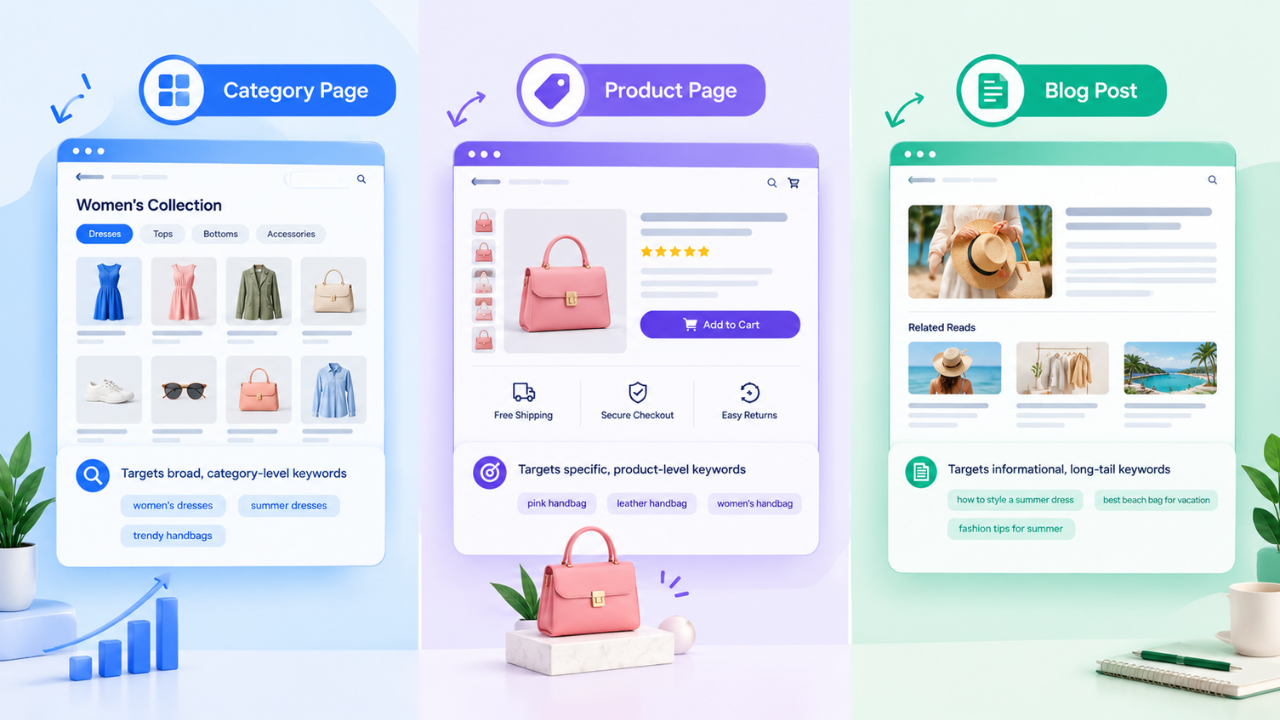
Before optimizing anything, decide which page type owns which keyword. This prevents keyword cannibalization, where two of your pages compete for the same query.
| Page type | Search intent | Example keyword | Content style |
| Category/collection page | Commercial: shopper wants to browse options | men’s formal shoes | Product grid plus short helpful copy |
| Product page | Transactional: shopper knows what they want | Brand X leather oxford, black, size 9 | Specs, images, reviews, price |
| Blog post | Informational: shopper wants to learn | how to choose formal shoes | Guide, comparison, how-to |
A quick test: search your target keyword and look at page 1. If it is mostly category pages, you need a category page. If it is mostly guides, write a blog post and link it to the relevant category.
How to Choose and Map Keywords for Category Pages
- Start with the category name shoppers actually use: Check Google’s autocomplete, “People also ask,” and Search Console queries for wording like “sneakers” vs “trainers.”
- Assign one primary keyword per category page: Add two to four close variations as secondary terms.
- Check volume against difficulty: Broad terms are competitive. Narrower ones (“white leather sneakers for women”) are easier and often convert better.
- Build subcategories from real demand: If people search by color, material, size, or occasion, and you stock enough products to fill a useful page, consider a dedicated subcategory.
On-Page Optimization: Formulas and Examples
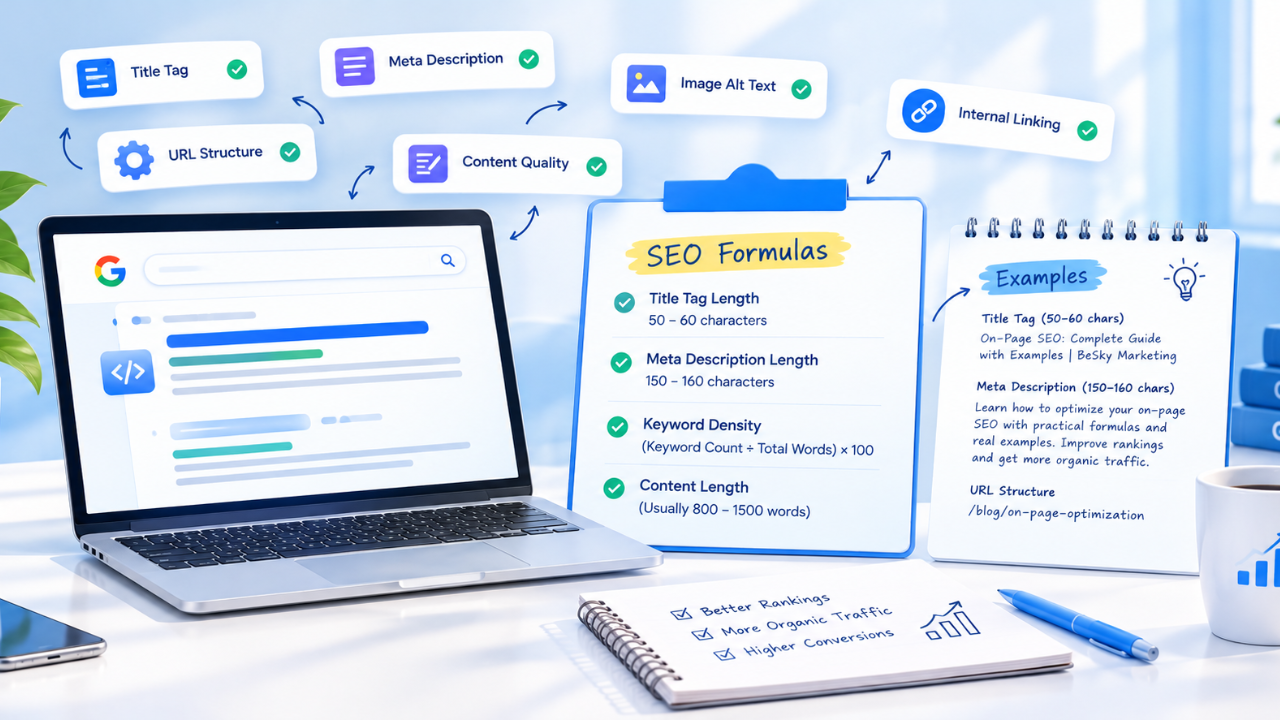
Title tag (about 50 to 60 characters): Primary keyword + a qualifier + brand.
Example: Women’s Running Shoes: Lightweight & Cushioned | BrandName
H1: One per page, matching the category name and the search intent.
Example: Women’s Running Shoes
URL: Short, lowercase, keyword-based, with no dates or parameters.
Example: /collections/womens-running-shoes
Meta description (about 150 to 160 characters): Say what the shopper will find and why to click.
Example: Shop lightweight women’s running shoes for road and trail. Free returns, sizes 4 to 11, and a fit guide to help you choose.
Image alt text: Describe what is in the image, for example, Women’s blue road running shoe, side view, rather than repeating the keyword.
Product cards: Clear product names, prices, and availability. Your product grid is a large part of the page’s real content.
What to Write on a Category Page (and Where to Put It)
A page with only images and prices gives Google little context. Add concise copy that covers:
- What the category includes
- Who the products are for
- One or two buying considerations (material, fit, use case, price range)
- Links to related subcategories and a relevant guide
Length: There is no required word count. For most collections, 500 to 800 words are enough. Broad, competitive categories can support more, provided every sentence is useful.
Placement: A short intro (two to three sentences) above the product grid sets context without pushing products down. Longer supporting content, such as a buying guide or FAQs, usually works better below the grid. On mobile, keep products visible without excessive scrolling.
Sample category description:
Our men’s formal shoes range from classic leather oxfords to modern derbies, made for office wear, weddings, and special occasions. Choose full-grain leather for durability, or suede for a softer look. Not sure about fit? See our shoe size guide or browse men’s loafers and dress boots.
It names the products, explains who they are for, offers one buying tip, and links to related pages naturally.
Internal Linking and Breadcrumbs
Google recommends clear site structures and crawlable links so it can understand how categories, subcategories, and products relate.
- Link down: from a parent category to its subcategories and best-selling products. A “Men’s Shoes” page should link to “Formal Shoes,” “Sneakers,” and “Boots.”
- Link across: between closely related categories, such as “Running Shoes” and “Running Socks.”
- Link up: from product pages back to their category, and from blog posts to the collections they support.
- Use descriptive anchor text like “women’s running shoes,” not “click here.”
- Add breadcrumbs (Home > Women > Running Shoes). They help shoppers navigate and give search engines a clear hierarchy.
- Keep important categories within a few clicks of the homepage, and link to them from the main navigation.
- Use real links. Links that only appear after a JavaScript action may not be discovered.
Technical SEO for Category Pages
Faceted navigation and filters: Filters for size, color, price, and brand can generate huge numbers of URL variations. Decide which filtered pages deserve to rank (for example, “black running shoes” with real search demand) and which should not. For the rest, use canonical tags pointing to the main category, or noindex where appropriate. Note that blocking a URL in robots.txt stops crawling but does not reliably remove it from the index, and Google cannot see a canonical or noindex on a page it cannot crawl.
Pagination: Give each paginated page its own crawlable link and a self-referencing canonical. Do not canonicalize page 2 onto page 1. Google no longer uses rel=”prev”/”next” as an indexing signal. If you use infinite scroll or a “load more” button, make sure paginated URLs still exist for crawlers.
Out-of-stock and discontinued products: Keep temporarily unavailable products visible and marked as such where possible. For permanently discontinued products, redirect to the closest relevant product or category. If a whole category is retired, redirect it instead of leaving a dead page.
Other checks:
- Indexability (no accidental noindex) and XML sitemap inclusion
- Correct canonical tags and no duplicate URLs
- Mobile usability and Core Web Vitals, especially image-heavy product grids
- Broken internal links
Shopify notes:
- Shopify collection pages can also be reached at /collections/x/products/y. These should canonicalize to /products/y. Confirm your theme outputs the canonical tag correctly.
- Tag filtering (/collections/x/tagname) and storefront filter parameters can create duplicate or near-duplicate URLs. Audit them in Search Console and control them through canonicals and, where needed, an edited robots.txt.liquid.
- Collection descriptions are edited in the collection settings, but where they display depends on your theme. Check the theme editor to place copy above or below the grid.
- Use Shopify’s automatic sitemap, and review whether low-value collections (empty, seasonal, or internal-only) should be noindexed.
Structured Data for Category Pages
Structured data should always match what is visible on the page. Useful types include:
- BreadcrumbList: matches your visible breadcrumbs
- CollectionPage and ItemList: describe the page as a collection of products
- Organization: clarifies who you are across the site
FAQPage markup is fine for clarity, but Google now shows FAQ rich results only for a limited set of authoritative sites, so do not expect a SERP feature from it. Test your markup with the Rich Results Test and monitor for errors in Search Console.
How to Get Category Pages Cited in AI Search

Google states that there are no special technical requirements for appearing in AI Overviews or AI Mode. The same fundamentals apply: helpful, crawlable, indexable content. What you can do is make your pages easier to extract from and worth citing.
- Lead each section with a direct answer: Put a 40 to 60 word answer under a question-style heading, then expand. AI systems tend to lift passages, not whole pages.
- Use structured formats: Comparison tables, numbered checklists, and clear definitions are easy to quote accurately.
- Add original information: First-hand results, your own audit findings, or your sizing data give systems a reason to cite you instead of the ten pages that already say the same thing.
ADD: one real finding from your own client work here.
- Support claims with sources: Link to primary documentation such as Google Search Central.
- Cover related questions on the page: category vs product page SEO, how long category descriptions should be, whether to noindex filtered pages.
- Show who wrote it: Include an author bio, credentials, and a last-updated date.
- Check crawler access: Make sure your robots.txt is not unintentionally blocking search and AI crawlers you want visibility in, such as OAI-SearchBot or PerplexityBot. ChatGPT search draws on Bing’s index, so submit key URLs through Bing Webmaster Tools or IndexNow.
- Keep your brand and entity details consistent across your site, social profiles, and directories.
How to Measure Category Page Performance
Rankings alone do not show business impact.
Track:
- Search Console: Filter Performance by page (URL contains /collections/) and exclude branded queries with a regex filter to see non-branded clicks, impressions, CTR, and average position.
- GA4: Use the Landing page report with organic search as the source to see sessions, engagement, and conversions. Add revenue through your ecommerce reporting.
- Trends over time: Compare before and after each content or structure update, and check which queries each collection actually ranks for versus your keyword map.
- Review cadence: Audit category pages quarterly, or whenever inventory, pricing, or search demand changes noticeably.
Category Page SEO Checklist
- One primary keyword mapped per category page
- Title, H1, URL, and meta description follow the formulas above
- 500 to 800 words of useful category content, placed sensibly
- Links to subcategories, related categories, and a supporting guide
- Breadcrumbs visible and marked up with BreadcrumbList
- Facets, pagination, and duplicate URLs controlled
- Canonical, indexability, and sitemap checked
- Out-of-stock and discontinued products handled
- Direct answers, tables, and a visible author and update date
- Non-branded clicks and revenue tracked in Search Console and GA4
Final Takeaway
Category pages rank when they serve a clear search intent, offer more than a product grid, sit in a logical structure, and stay technically clean. Do not create collection pages just to insert keywords. Build pages that help shoppers find the right products, and search engines and AI systems will have good reason to surface them.
If you would like support with category optimization as part of a wider SEO strategy, BeSky Marketing offers eCommerce SEO services focused on improving website visibility, technical SEO, content, and organic growth.
FAQs
What is eCommerce category page SEO?
It is the optimization of category and collection pages so search engines understand their purpose and shoppers can easily find relevant products.
Can category pages rank on Google?
Yes. Indexable category pages rank when they match commercial intent, contain helpful content, have strong internal links, and load well.
How long should a category page content be?
Most collections work well with 500 to 800 words. Length matters less than usefulness.
Should I noindex filtered category pages?
Usually yes for filter combinations with no search demand, using canonicals or noindex. Keep indexable only the filtered pages people genuinely search for, such as color or material variations.
What is the difference between a category page and a product page for SEO?
Category pages target broader commercial keywords and help shoppers compare options. Product pages target specific, high-intent queries for a single item.
How often should I update category pages?
Quarterly, or whenever products, seasonal demand, or search trends change.
