Performance Max has been Google’s most divisive ad product since it launched.
Advertisers who set it up properly love it. Advertisers who treated it like a standard campaign and handed Google the wheel without guardrails watched their budget disappear into placements they’d never have approved manually.
In 2026, Performance Max campaigns have matured significantly. Google has added more transparency, more controls, and better reporting. But the fundamental truth hasn’t changed: PMax amplifies what you give it. Good inputs produce good results. Poor inputs produce expensive noise.
This is your complete Performance Max campaigns 2026 guide – what it is, how it works, where it works best, and how to set it up to actually perform.
What Is Performance Max?
Performance Max – usually called PMax – is a campaign type that runs across all of Google’s inventory from a single campaign. One budget, one campaign, everywhere Google shows ads.
That means your ads can appear on:
- Google Search (including Shopping results)
- YouTube
- Google Display Network
- Gmail
- Google Discover
- Google Maps
The AI-driven allocation engine decides where and when to show your ads based on your conversion goals and the creative assets you provide. You give it the budget, the assets, and the target – Google’s machine learning figures out the placement mix that best achieves that target.
This is either its greatest strength or its greatest weakness, depending on how well you’ve set it up.
How Performance Max Works in 2026
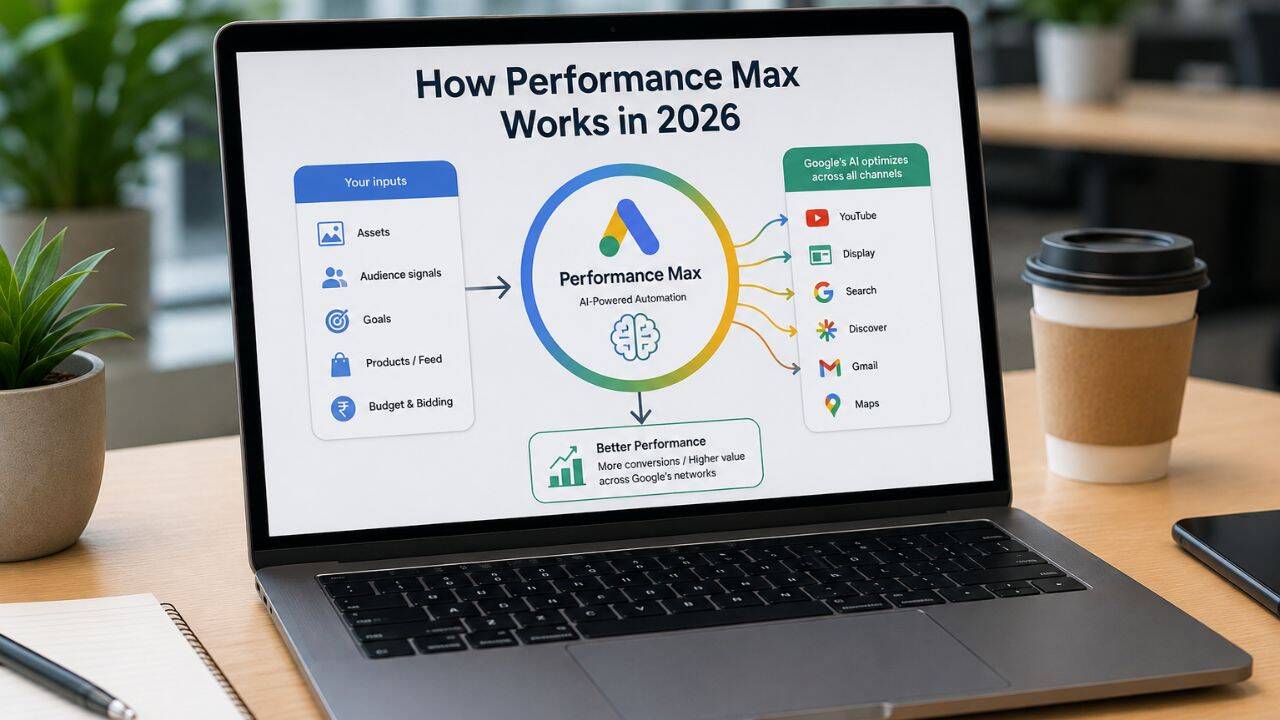
Understanding the mechanics helps you use PMax intelligently rather than just hoping the algorithm does the right thing.
The Asset Group Structure
PMax doesn’t use traditional ad groups. Instead, it uses Asset Groups – collections of creative elements that the AI combines and tests:
- Headlines (up to 15 – short and long)
- Descriptions (up to 5)
- Images (multiple formats – square, landscape, portrait)
- Videos (YouTube URLs or auto-generated from your images)
- Logos
- Sitelink extensions
- Call-to-action text
Google’s AI combines these elements to create ads dynamically across all placements. A strong video might dominate on YouTube. A compelling headline combination might drive Search clicks. The same campaign, different surfaces.
Audience Signals – The Most Important Input
Audience signals are not targeting – they’re guidance. You’re telling Google’s AI “these are the types of people who convert for us, use this as a starting point.”
Strong audience signals include:
- Your customer list (email-based custom audiences from CRM data)
- Website visitors (especially high-intent pages – pricing, contact, cart)
- Custom intent audiences based on search terms related to your offering
In 2026, the quality of your audience signals is the single biggest differentiator between PMax campaigns that work and ones that don’t. Uploading a broad, unqualified customer list produces broad, unqualified traffic.
Conversion Goals and Tracking
PMax is entirely conversion-goal driven. Without accurate conversion tracking, the algorithm has no signal to optimise toward – and will default to proxy metrics that don’t necessarily reflect business value.
You must have properly tracked conversions before running PMax. This means:
- Form submissions tracked via Google Tag Manager
- Phone calls tracked (call extensions connected to call tracking)
- WhatsApp clicks tracked as conversion events
- E-commerce purchases with revenue values if you’re running shopping
PMax Google Ads 2026: Where It Works Best
Performance Max isn’t the right tool for every situation. Here’s an honest breakdown.
PMax Works Well For:
eCommerce businesses with product feeds. PMax is extremely powerful for eCommerce – it pulls from your Merchant Centre product feed and runs Shopping, Display, YouTube, and Search ads simultaneously. If you have a well-structured product feed and clear ROAS targets, PMax is often the most efficient eCommerce campaign type available in 2026.
Businesses with strong conversion volume. PMax’s AI needs data to learn. If you’re generating 50+ conversions per month, the algorithm has enough signal to optimise meaningfully. Below this threshold, the learning period is prolonged and results are inconsistent.
Multi-channel brands with diverse creative assets. If you have video content, strong product photography, and varied creative, PMax leverages all of it. Campaigns with rich asset variety consistently outperform those with minimal creative.
Lead generation at scale. For businesses targeting large geographic areas with clear lead generation goals, PMax can drive volume efficiently – provided the lead quality signals are fed back into the system through offline conversion imports.
PMax Does Not Work Well For:
Businesses with no conversion history. If you’re launching a brand new Google Ads account with no historical data, PMax’s learning period will be expensive and unpredictable. Start with Search campaigns, build conversion data, then layer PMax in.
Highly specific audience targeting needs. PMax’s audience signals are guidance, not restrictions. If your product is only relevant to a very specific niche that Google’s AI struggles to find, the broad reach of PMax can produce significant wasted spend.
Brand protection campaigns. PMax will sometimes bid on your own branded terms – potentially cannibalising cheaper branded Search traffic. Always run a separate branded Search campaign and use brand exclusions in PMax settings.
Performance Max Guide: How to Set It Up Properly
Step 1: Build Your Asset Groups Strategically
Don’t create one giant asset group with everything thrown in. Create separate asset groups for different product categories, service lines, or audience types.
For an SEO agency, separate asset groups might be:
- eCommerce SEO services → eCommerce-specific headlines, images, landing page
- Local SEO services → Local SEO-specific messaging and creative
- Content marketing services → Content marketing-specific creative set
Each asset group should have a dedicated, relevant landing page – not your homepage. The landing page should mirror the messaging in your asset group headlines.
Step 2: Upload Audience Signals Correctly
Priority order for audience signals:
- Customer match list (your actual customers – highest quality signal)
- Remarketing audiences (website visitors, especially high-intent pages)
- Custom intent audiences (people searching terms related to your service)
- Similar audiences based on your converters
Upload at minimum a customer match list and a website remarketing audience before running PMax. Campaigns launched without audience signals take significantly longer to exit the learning phase.
Step 3: Set a Realistic ROAS or CPA Target
The most common PMax mistake: setting an overly aggressive target from day one.
If your historical Cost Per Lead is ₹1,200 and you set a Target CPA of ₹500, the algorithm will severely restrict delivery trying to hit an unrealistic target. Start with a Target CPA at or slightly above your historical average, let the campaign optimise for 4–6 weeks, then gradually tighten the target.
Step 4: Use Brand Exclusions
Brand exclusions in PMax – available in campaign settings – prevent your PMax campaign from showing on searches for your brand name. This is critical if you’re running a separate branded Search campaign, as PMax can otherwise cannibalise cheaper branded clicks.
Step 5: Monitor the Insights Tab, Not Just Metrics
PMax’s standard metrics tab shows limited information. The Insights tab shows you:
- Which audience segments are converting
- Which asset combinations are performing best
- Search term themes driving traffic (not exact terms, but thematic categories)
In 2026, Google has improved PMax reporting significantly – the Insights tab now shows search categories and asset performance ratings that give you more control over what’s working.
Google PMax Strategy: What to Avoid
Launching Without Creative Assets
PMax auto-generates video from your images if you don’t upload videos. Auto-generated videos are generally poor quality and can appear on YouTube, potentially harming brand perception. Always upload at least one properly produced video – even a simple 15-second product or service overview is better than an auto-generated slideshow.
Running PMax Alongside Standard Shopping Without Exclusions
If you run both a PMax campaign and a standard Shopping campaign targeting the same products, PMax will usually win the auction – potentially disrupting Shopping campaigns that were already performing well. Use campaign priority settings or product feed segmentation to manage overlap.
Ignoring the Learning Phase
PMax campaigns take 6–8 weeks to exit the learning phase and produce stable results. Don’t make major changes to budget, targets, or asset groups during this period – each significant change resets the learning phase. Patience in the first two months determines whether PMax becomes a high-performing channel or gets abandoned too early.
Not Importing Offline Conversions
For lead generation businesses, the leads you receive from PMax need to have their quality fed back to Google. If you import offline conversion data (marking which leads actually became customers), PMax’s algorithm can optimise toward quality leads rather than just volume. Without this, PMax optimises for lead form completions – which may include low-quality enquiries.
The Bottom Line
Performance Max in 2026 is a powerful tool for the right business in the right situation. It’s not a shortcut, and it’s not a set-and-forget channel. It rewards advertisers who invest in creative quality, audience data, conversion tracking accuracy, and patient optimisation.
For eCommerce businesses with product feeds and strong creative assets, PMax is often the best campaign type available. For service businesses generating 50+ conversions per month with a clear CPA target, it can deliver strong results. For new accounts or niche-audience businesses, start with Search and use PMax only once the data foundation is in place.
Want Help Running Performance Max Campaigns?
At BeSky Marketing, we set up, optimise, and manage Google Ads campaigns for Indian businesses – helping brands lower Google Ads CPC in 2026 through smarter campaign structures, audience targeting, bid strategies, Quality Score improvements, and conversion-focused optimisation.
Frequently Asked Questions (FAQs)
Q1. Is Performance Max better than standard Google Search campaigns?
Not better – just different. Search campaigns offer precise keyword control and high-intent targeting, while PMax uses AI for broader, multi-channel reach. Many advertisers use both for best results.
Q2. How much budget does a Performance Max campaign need?
PMax works best with enough budget for 50+ monthly conversions. For most Indian businesses, this means around ₹1,500–₹3,000/day, depending on industry CPC and CPA.
Q3. Can I see which keywords trigger PMax ads?
Not exactly. PMax doesn’t show full search term data like Search campaigns. You get search category insights, plus negative keywords and brand exclusions for better control.
Q4. How do I stop PMax from cannibalising other campaigns?
Use brand exclusions, negative keywords, and feed segmentation. This helps protect branded searches and prevents overlap with high-performing Search or Shopping campaigns.
Q5. How long does Performance Max take to show results?
PMax usually needs 6–8 weeks to learn and 8–12 weeks for stable performance. Avoid major edits during this period, as big changes can reset learning.
